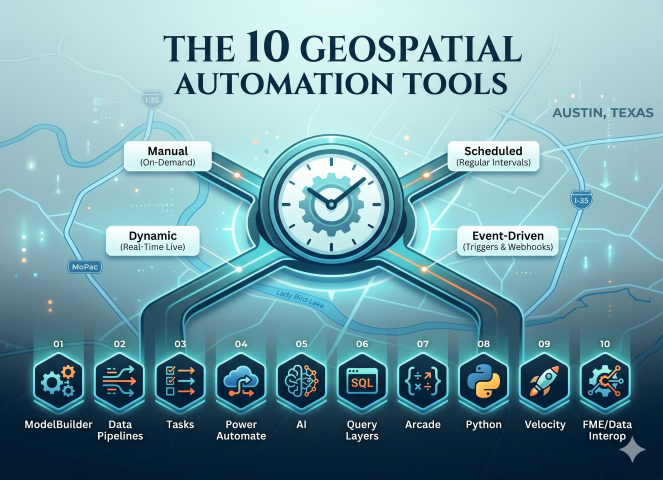
For many organizations, the GIS department is a one or two-person operation. That small team is expected to maintain data, respond to requests, build maps and dashboards, support field crews, and keep everything current. When a GIS team is overburdened, any process that runs manually is a process that competes for the valuable, limited hours in the day.
Teams looking for a little breathing room often make the switch to automating workflows. A well-automated GIS workflow does not just save time; it reduces errors, improves consistency, and frees up the GIS professional to focus on the work that actually requires their expertise. For a small team, automation is not a nice-to-have, it is a way to meet workload demands.
Automation isn’t a one-size-fits-all solution. The right tool depends entirely on when and how a process needs to run. By categorizing your workflows into these four execution types, you can better match your limited time to the most efficient technology. While we dive deeper into the theory behind these in our Automation, Automation, Automation article, they can be summarized as follows:
- Manual: tools and scripts that process data on demand, often requiring a variable or two to be updated manually before execution.
- Dynamic: results are calculated with an action such as panning the map or clicking a pop-up.
- Scheduled: workflows run at regular intervals (hourly, nightly), processing and delivering data on a set timetable.
- Event-Driven: run in response to a specific trigger (email, webhook, edit feature), firing a workflow when something happens.
| Tool | Manual | Dynamic | Scheduled | Event-Driven |
|---|---|---|---|---|
| 01 — ModelBuilder | ||||
| 02 — Data Pipelines | ||||
| 03 — Tasks | ||||
| 04 — Power Automate | ||||
| 05 — Artificial Intelligence | ||||
| 06 — Query Layers (SQL) | ||||
| 07 — Arcade | ||||
| 08 — Python | ||||
| 09 — Velocity | ||||
| 10 — FME / Data Interop |
This article is written for any GIS professional, but mainly for those working in small or lean team environments. No programming experience is required; the majority of tools covered here require none, though the later sections do introduce Python and scripting concepts for those ready to take that step.
The ArcGIS platform and its surrounding ecosystem offer a surprisingly deep toolkit for automation, much of it already available to organizations with an existing ArcGIS license. This article walks through ten of those tools, from no-code visual builders to real-time streaming platforms, categorized by the type of automation each enables, and aimed squarely at the small team looking to do more with what they already have.
1: Model Builder
ModelBuilder has been a standard tool in ArcGIS Desktop for over a decade and is often where geospatial professionals begin their automation journey. ModelBuilder is entirely visual and requires no coding knowledge, making it one of the most accessible entry points into automation for a small team. It allows geoprocessing tools to be dropped onto a canvas and chained together into a repeatable workflow. Once built, models can be scheduled, exported to Python, or published to ArcGIS Enterprise.
Execution Type: Manual | Scheduled
2: Data Pipelines
ArcGIS Data Pipelines is a web-based ETL (extract, transform, and load) tool designed to assist with processing data in ArcGIS Online and, as of the 12.1 release, ArcGIS Enterprise. It is reminiscent of ModelBuilder in that it offers a drag and drop interface, making it an accessible tool for users newer to geospatial ETL. It allows data to be loaded from feature layers, cloud databases (Snowflake, BigQuery, and Databricks), cloud storage (Amazon S3, Azure Storage), files, and URLs.
Data can be transformed and cleaned using common ETL operations such as field mapping, field calculation, and spatial functions like buffer and intersect, so that once it is loaded into your organization, it is prepared and ready for consumption. For ArcGIS Online users, Data Pipelines is included as part of the subscription. For ArcGIS Enterprise users, the standard edition is included when licensed at the ArcGIS Server Advanced level.
Execution Type: Manual | Scheduled
3: Tasks
Tasks work within ArcGIS Pro and are designed to guide the user through a set of predetermined steps needed to complete a workflow. Tasks provide automation while keeping the human in the loop, making them an important consideration for a team’s automation toolkit.
Geoprocessing steps can be configured to be “click and run,” reducing the chance of steps being skipped or executed out of order. That kind of guided consistency is especially valuable when handing off a process to a colleague or onboarding someone new, ensuring the workflow runs the same way every time regardless of who is running it.
It is worth noting that the dynamic and event-driven aspects of Tasks work a little differently than the other tools in this article. A Task must be started manually, but once underway, individual steps can advance dynamically or respond to events occurring in the map, such as a feature being selected or an edit being made, before continuing to the next step.
Execution Type: Manual | Dynamic | Event-Driven
4: Power Automate
ArcGIS includes connectors for Microsoft Power Automate that provide the ability to automate data processing based on different events. For example, when a feature layer is edited, a webhook can trigger Power Automate to send a notification email, update a record in another system, or calculate a field value. Workflows can also be triggered manually, making Power Automate a flexible option for both on-demand and event-driven automation.
For small government teams, Power Automate is worth a closer look for one practical reason: most government organizations are already running Microsoft 365, which means Power Automate may already be available at no additional cost. That lowers the barrier to entry significantly compared to other tools on this list and makes it a natural first step for teams looking to bridge their GIS workflows with other business systems like SharePoint, Teams, or Outlook.
Execution Type: Manual | Event-Driven
5: Artificial Intelligence
Geospatial Artificial intelligence (GeoAI) is being integrated into ArcGIS in several new ways. For some time, GIS professionals have been able to utilize AI within the Python framework to analyze data, such as extracting building footprints from aerial imagery or powerlines from LiDAR. More recently, Esri has integrated AI tools directly into ArcGIS Online and Enterprise to assist with item descriptions, titles, summaries, and tags.
Of all the tools covered in this article, AI is the most rapidly evolving. Esri has been expanding its GeoAI capabilities, bringing machine learning and deep learning workflows into ArcGIS Pro and ArcGIS Online through tools like the Image Analyst extension and the ArcGIS API for Python’s arcgis.learn module. More recently, Esri has introduced AI assistant features aimed at helping users find content, generate code, and navigate the platform. For small teams, the most practical entry points right now are the metadata and content generation tools already built into ArcGIS Online; low barrier, immediately useful, and a good way to get familiar with how AI is being woven into the platform before the deeper capabilities mature.
Execution Type: Manual | Event-Driven
6: Query Layers (SQL)
If you are using ArcGIS Pro and/or ArcGIS Server (included with ArcGIS Enterprise), you can build query layers and publish them into your maps. Query layers are built using standard SQL and are designed to work directly with your RDBMS (SQL Server, PostgreSQL, Oracle) or cloud data warehouses (Snowflake, BigQuery, Redshift).
Note that your data does not have to be in a geodatabase — it can be any supported database, including other business systems like a permitting system, asset management platform, or financial database. Because the data lives directly in the source system and the map simply reflects it, there is no ETL step or scheduled refresh needed, making query layers one of the lowest maintenance automation options available to a small team.
Execution Type: Dynamic
7: Arcade
ArcGIS Arcade is a scripting language designed by Esri to allow for automation within the ArcGIS platform. It is designed to be usable across the different Esri products (Pro, Enterprise, Geodatabase, Dashboards, Field Maps, etc.) allowing your automation to be executed when and where it is needed. While many GIS professionals first encounter Arcade through labeling and symbology, its capabilities run much deeper.
Arcade powers attribute rules that automatically calculate or validate field values when data is edited, form calculations that guide field crews through data collection in Field Maps, and pop-up expressions that dynamically format and display information in your maps and dashboards, all without requiring a full script or scheduled job. This makes Arcade one of the most versatile tools in the stack, capable of spanning dynamic, event-driven, and manual automation depending on how and where it is applied.
Execution Type: Manual | Dynamic | Event-Driven
8: Python
When working in the ArcGIS platform, you have access to two Python libraries that allow you to automate your data workflows: ArcPy and the ArcGIS API for Python. Each one is aimed at slightly different scenarios, with ArcPy being the original and designed for geoprocessing and analysis, and the ArcGIS API for Python being newer and aimed at working with your web GIS. Each has some overlap with the other, with both allowing your data loading and analysis to be automated in a scriptable fashion.
Being standard Python libraries, this means that while using them you also have access to the hundreds of modules and libraries built right into the base version of Python.
Execution Type: Manual | Scheduled
9: Velocity
ArcGIS Velocity is Esri’s tool for real-time and near-real-time data processing, allowing data to be sent and received from vehicles, IoT sensors, and other streaming sources. It allows for common data processing such as field mapping and calculations, along with basic geospatial functions such as intersect, proximity analysis, and pattern detection. More advanced calculations can be performed utilizing Arcade, making it a natural companion to the scripting capabilities covered earlier in this article.
It runs as a SaaS product in ArcGIS Online and is available on-premises with ArcGIS Enterprise 12.1.
Execution Type: Dynamic | Scheduled | Event-Driven
10: FME/Data Interoperability
Safe Software’s FME (Feature Manipulation Engine) is considered the Swiss Army Knife of geospatial automation. Not only can it handle over 450 data formats, transforming them into the data you need and writing it directly into your Enterprise Geodatabase or hosted feature layer, but it can also handle spatial analysis, real-time, and near-real-time data processing. From sending and receiving emails to webhooks and event messages, FME can handle everything you throw at it and truly is the most versatile geospatial automation tool on this list.
It is worth noting that FME is a third-party product from Safe Software and requires a separate license outside of the ArcGIS platform. However, if your team has access to it, FME is in a category of its own. Every automation type covered in this article (manual, dynamic, scheduled, and event-driven ) is achievable within a single FME workflow, consolidating what might otherwise require multiple tools, languages, and skillsets into one package. For a small team already stretched thin, that kind of versatility has real operational value.
For organizations not ready to commit to a full FME license, Esri offers the Data Interoperability extension for ArcGIS Pro and ArcGIS Enterprise. Sold directly by Esri, it is built on the FME engine but offers a slimmed-down version of its capabilities. For a full breakdown of what is and isn’t included, see ArcGIS Data Interoperability and FME.
Execution Type: Manual | Dynamic | Scheduled | Event-Driven
+1: ArcGIS PowerShell DSC
Deploying and maintaining ArcGIS Enterprise is one of the most time-consuming tasks a small GIS team faces. Whether standing up a new environment, applying updates, or ensuring consistency across multiple deployments, the process is complex and easy to get wrong. Esri provides an open-source PowerShell Desired State Configuration (DSC) module on GitHub that allows the entire ArcGIS Enterprise stack — base deployment, Web Adaptor, Data Store, and supporting components — to be defined in a configuration file and deployed automatically.
For a small team managing more than one environment — such as separate production and staging deployments — PowerShell DSC means both environments can be built and maintained from the same configuration, eliminating the drift that comes from manual setup. It also means that rebuilding an environment after a failure or a hardware change is a repeatable, documented process rather than a scramble through installation guides.
This one sits slightly outside the data automation theme of the rest of this article, but for the GIS professional who is also responsible for managing their own infrastructure it may be the most impactful automation of all.
Execution Type: Manual
As the famous xkcd comic on automation reminds us, not every task is worth automating. If a manual process takes five minutes a week, the time spent building and maintaining an automated solution may never pay off. Automation can feel overwhelming when you look at the full landscape of tools available — but the goal of this article was never to suggest you need all ten. The small team of GIS professionals does not need to master every tool on this list. They need to identify the right tool for the right problem, and build from there.
A practical place to start is with the automation type that addresses your biggest pain point. If your maps are always showing stale data, Query Layers may solve that today with nothing more than a SQL query. If you are repeating the same geoprocessing workflow every Monday morning, ModelBuilder or a scheduled Python script can take that off your plate. If your organization is already running Microsoft 365, Power Automate may already be sitting there waiting to be put to work.
The ArcGIS platform and its surrounding ecosystem have matured to the point where meaningful automation is within reach for any GIS professional, regardless of team size or technical background. The tools are there. The question is simply where to start.
If you are looking for help identifying where automation can have the biggest impact for your organization, Spatialty specializes in geospatial automation and data workflows.