

Recently, we have been working on an ArcGIS Dashboard in ArcGIS Enterprise that shows the progress of collecting data about assets in the field. One aspect of the data collection process is capturing photos of the assets. The query below dynamically counts the number of pictures attached to the feature class, making it possible to show an indicator on the dashboard of the number of attached photos. This query is then published as a Query Layer. This is an excellent example of a form of Dynamic Automation discussed on this page here.
SELECT fc.*         -- Select all columns from the feature class table (fc)
     , fcat.Count   -- Count of attachments for each feature
     , fcat.MaxDate -- The most recent attachment date for each feature
FROM GDB.camping_history_evw AS fc -- Main feature class table (evw typically means "versioned" in Esri schema)
         FULL OUTER JOIN (SELECT REL_GLOBALID                   -- Attachment related to a specific feature, identified by GlobalID
                               , COUNT(REL_GLOBALID) AS Count   -- Count attachments
                               , MAX(created_date)   AS MaxDate -- Get the most recent attachment date
                          FROM GDB.camping_history__attach_evw -- Attachments table, stores feature attachments, also versioned
                          GROUP BY REL_GLOBALID) AS fcat -- Group by the feature’s GlobalID to aggregate counts and dates
                         ON fc.GLOBALID = fcat.REL_GLOBALID -- Join the attachments on matching GlobalID from feature class
where fcat.Count > 0 -- Only return records that have one or more attachments
In the screenshot below, points with a red outline represent features with attachments, while those without an outline do not. It’s important to note that when adding this query layer to the map, it doesn’t support full Geodatabase functionality, so attachments won’t appear in the pop-ups. To work around this, pop-ups were disabled for the query layer, and the original feature class was also added to the map. The query layer is symbolized with a hollow circle, while the original feature class is shown with a smaller solid circle, creating a halo effect around points with attachments. This way, clicking on a point opens the pop-up from the original feature class, displaying the attachments.
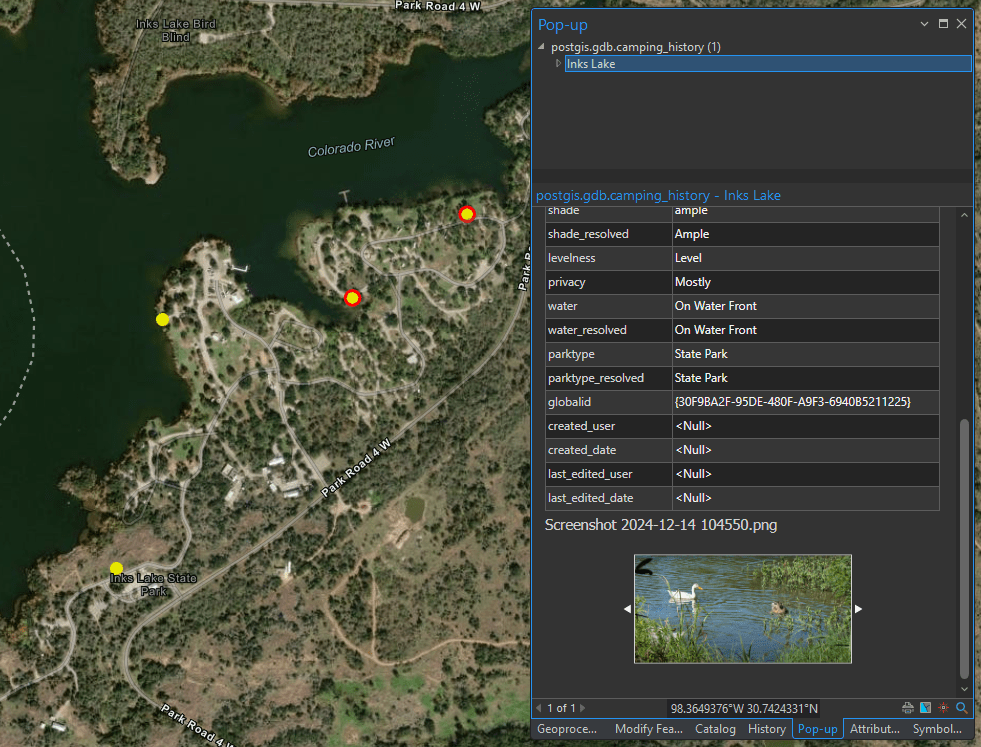
The query has been tested on both SQL Server and PostgreSQL, with attachments enabled on the feature class within an Enterprise Geodatabase.
The feature class also has Traditional versioning enabled, which is why the FROM clause includes “_evw”. If your feature class is not versioned, you can omit this part.
Additionally, if your feature class has Subtypes or Domains enabled, the second join in the SQL statement retrieves the subtype description from the linked view. More details can be found in the article below.


 Spatialty