

In one of our Enterprise Geodatabases, we manage a feature class that synchronizes with a table in another database. This external database is responsible for assigning a unique ID to each feature. Because the external system retains all data and doesn’t delete records, we’ve configured the Geodatabase to ensure that features with assigned IDs are never deleted. To enforce this behavior, we use an Attribute Rule powered by Arcade code, which ensures data consistency between the two systems. Below, we’ll dive into the details of the Attribute Rule and share the Arcade code used for this setup.
For more information on Attribute Rules, check out the Esri documentation. For sample Attribute Rules, including the one showcased here, explore this GitHub repository. Attribute Rules are written in Esri’s ArcGIS Arcade expression language—learn more about Arcade in the official documentation.
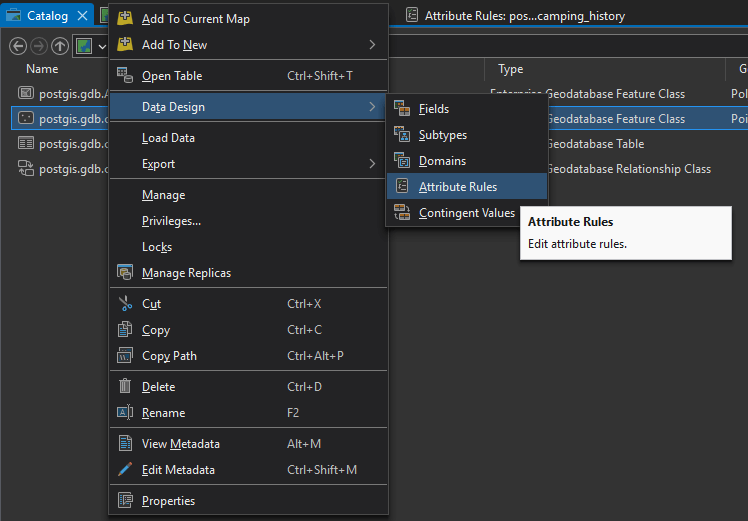
Right-click the feature class in your Enterprise Geodatabase and choose Data Design > Attribute Rules.
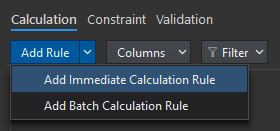
In the Attribute Rules tab, select Add Rule, then choose Immediate Calculation Rule.
Configure the rule as shown in the screenshot below. Copy the code from the snippet provided below the screenshot and paste it into your Attribute Rules editor.
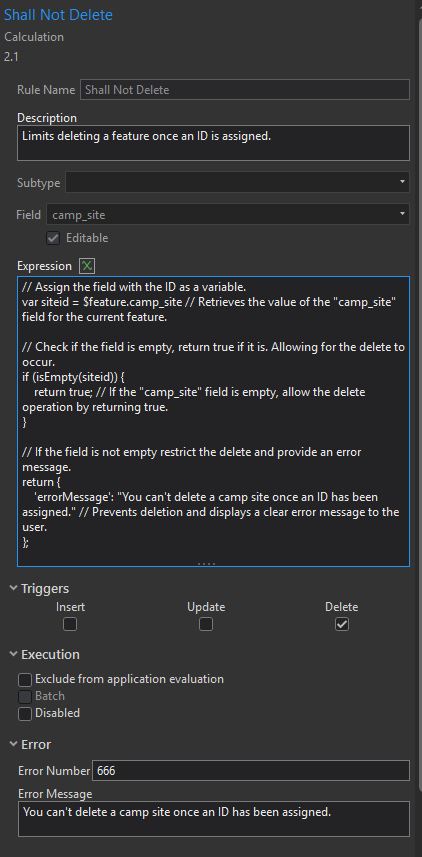
// Assign the field with the ID as a variable.
var siteid = $feature.camp_site // Retrieves the value of the "camp_site" field for the current feature.

// Check if the field is empty, return true if it is. Allowing for the delete to occur.
if (isEmpty(siteid)) {
    return true; // If the "camp_site" field is empty, allow the delete operation by returning true.
}

// If the field is not empty restrict the delete and provide an error message.
return {
    'errorMessage': "You can't delete a camp site once an ID has been assigned." // Prevents deletion and displays a clear error message to the user.
};
Here’s an example of the error message you would receive if you attempt to delete a feature after an ID has been assigned:
“You can’t delete a camp site once an ID has been assigned.”
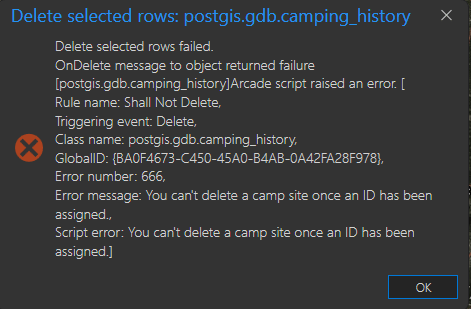
If you need to delete the feature, simply remove the ID value, save your edits, and then delete the feature using the standard editing tools.
This Attribute Rule is compatible with a minimum of ArcGIS Pro 2.1, Geodatabase 10.6, and Arcade 1.0.

This code was modified from the Arcade sample here.
https://github.com/Esri/arcade-expressions/blob/master/attribute_rule_constraint/prevent_delete.md
Written by Mike Long
Edited by Steph Long, Grammarly, and ChatGPT


 Spatialty