

As part of a recent client engagement, we were tasked with detecting spatial changes to individual point features within an enterprise geodatabase. The goal was to identify whether a point had moved when edited, critical for maintaining spatial accuracy in operational systems.
Feature Class Properties
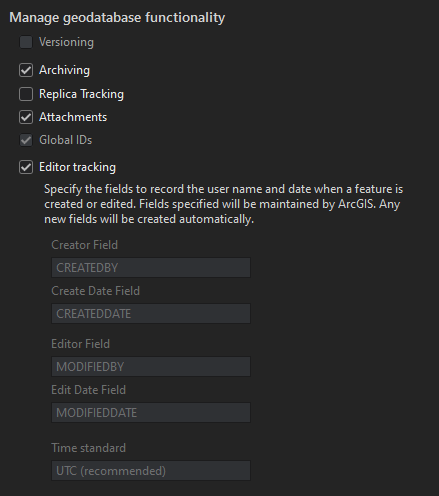
The feature class in question was stored in a SQL Server backed ArcSDE Enterprise Geodatabase. While not versioned, it was configured with Archiving enabled, meaning both current and historical records were maintained in the same table. This detail was essential to our approach, as it allowed us to compare live features directly against their most recent archived versions using a single SQL query.
To accomplish this, we implemented a SQLExecutor within an FME workbench. The logic compares the current SHAPE value of a feature against its most recent archived version. If the geometries differ, the script flags the feature as “Moved.”
What’s the code?
SELECT UNIQUE_ID,
       GDB_TO_DATE,
       SHAPE,
       CASE
           WHEN Shape.ToString() <> (SELECT TOP 1 Shape.ToString()
                                     FROM GDB.<featureclass>
                                     WHERE GDB_TO_DATE <> '9999-12-31 23:59:59.0000000'
                                       AND UNIQUE_ID= @Value(UNIQUE_ID)
                                     ORDER BY GDB_TO_DATE DESC)
               THEN 'Moved'
           ELSE 'NOT Moved'
           END AS FeatureLoc
FROM GDB.<featureclass>
WHERE GDB_TO_DATE = '9999-12-31 23:59:59.0000000'
  AND UNIQUE_ID = @Value(UNIQUE_ID)
This SQL is executed per feature, leveraging FME’s dynamic parameter passing (@Value(UNIQUE_ID)) to ensure accuracy and scalability. The results are then used to guide downstream actions, such as updates to a secondary database, logging, or generating alerts.
By combining FME’s automation capabilities with direct SQL logic against the geodatabase, we were able to deliver a highly efficient and reusable workflow. This solution saved the client significant manual review time and provided a scalable method for tracking spatial edits in production.
Providing a value from the Initiator feature
Code with Comments
SELECT UNIQUE_ID,
       GDB_TO_DATE,
       SHAPE,
-- In the CASE statement, the query is comparing the ToString() conversion of the SHAPE column with a subquery.
       CASE
           WHEN Shape.ToString() <> (
-- This is a subquery that retrieves the Shape.ToString() value from the same GDB.<featureclass> table, but with certain conditions
               SELECT TOP 1 Shape.ToString() --Retrieve just one value with the query and convert the shape column.
               FROM GDB.<featureclass> --The table we are selecting data from.
               WHERE GDB_TO_DATE <> '9999-12-31 23:59:59.0000000' --This filters the current version of the feature.
                 AND UNIQUE_ID = @Value(UNIQUE_ID) --This grabs that particular feature that we are comparing.
               ORDER BY GDB_TO_DATE DESC) --This orders the archive features so the most recent in on the top.
               THEN 'Moved' -- Sets if the feature has moved.
           ELSE 'NOT Moved' --Sets that the feature has not moved.
           END AS FeatureLoc --Assigns 'Moved' or 'NOT Moved' to the FeatureLoc field.
FROM GDB.<featureclass> --The table we are selecting data from.
WHERE GDB_TO_DATE = '9999-12-31 23:59:59.0000000' --Ensures that we are getting the most recent version of the feature.
  AND UNIQUE_ID= @Value(UNIQUE_ID) --This grabs that particular feature that we are comparing.


 Spatialty